


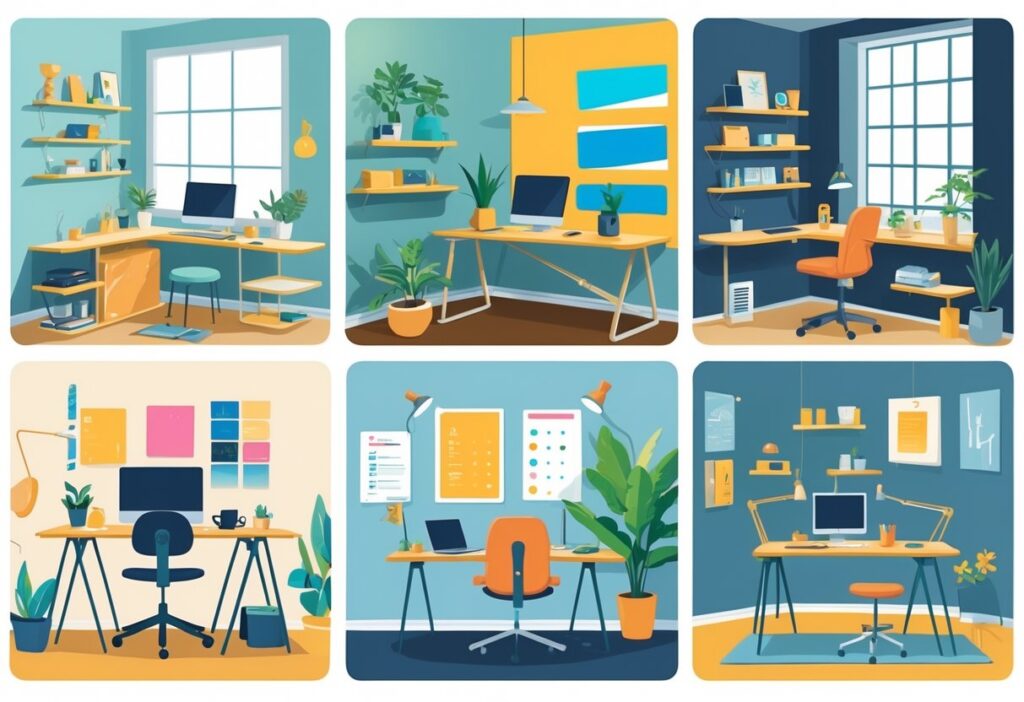
Your home office should work as hard as you do. It needs to blend style with smart function so your workspace actually supports your daily grind.
A lot of people end up with cramped, uninspiring setups that just drain energy. It’s tough to feel creative or focused in a space that doesn’t help you out.
The secret to transforming any workspace? Clever design choices that boost both looks and function—without a massive renovation. Whether you’ve got a whole room or just a spare corner, smart tweaks can make a huge difference in how your workspace feels.
Even small changes—like getting more natural light, using dual-purpose furniture, or adding personal touches—can turn a basic setup into something that actually inspires you. You want a space that’s professional yet still feels like your own, with everything you need close by and organised.
Key Takeaways
- Smart storage and organisation keep your workspace clutter-free and stylish.
- Personal touches—like art and décor—make the space yours while staying professional.
- Minimalist principles and the right furniture help maximise both space and style.
Essential Elements for a Stylish Home Workspace
A good home office really comes down to three things: smart layout planning, proper lighting, and ergonomic furniture. When these work together, you get a space that’s both practical and nice to look at.
Optimising Home Office Layout
How you arrange your workspace totally affects your workflow. Try placing your desk perpendicular to the wall instead of facing it head-on. This setup often feels more open and less boxed in.
Keep the stuff you use most within easy reach. Store printer paper, pens, and notebooks close to your main work area.
Essential layout zones include:
- Main work area for your computer and writing
- Storage for files and supplies
- Reference area for books and documents
If your space is tight, go vertical. Floating shelves above your desk are a lifesaver for keeping things tidy and off your work surface.
Think about how you move through the space. Give yourself at least 90 centimetres behind your chair so you’re not bumping into things every time you get up.
Maximising Natural Light and Soft Lighting
Natural light can do wonders for your mood and eyes during long workdays. Place your desk near a window, but don’t put your screen right in front of it—glare is the enemy.
No windows? No problem. Layer your lighting: overhead for general light, a desk lamp for tasks, and some ambient light to soften things up.
Effective lighting setup includes:
- Overhead ceiling light
- Desk lamp for focused work
- Ambient light to avoid harsh shadows
Warm white bulbs (2700K-3000K) make the space feel cozy. Cool white can be a bit too clinical for most home offices.
Window treatments like blinds or curtains help you control light levels throughout the day. You can keep your view but cut down on brightness when you need to.
LED strip lights behind your monitor add gentle backlighting and help with eye fatigue. It’s a small touch that makes a big difference.
Choosing an Ergonomic Chair and Comfortable Desk Setup
Your chair and desk are the backbone of your workday. A good ergonomic chair keeps your posture in check and helps prevent back pain.
Find a chair with adjustable height, lumbar support, and armrests. Your feet should rest flat on the floor, knees at a right angle.
Key ergonomic features:
- Seat height you can adjust (41-53 cm is ideal)
- Lumbar support that fits your lower back
- Armrests that line up with your desk
- Breathable fabric or mesh
Your desk should sit at a height where your arms relax while typing. Standard is 72-76 cm, but adjustable desks are great if you’re taller or shorter than average.
Keep your monitor 50-70 cm from your eyes. The top of the screen should be at or just below eye level to save your neck.
If your feet don’t touch the floor, grab a footrest. And keep your keyboard and mouse on the same level to avoid wrist pain.
Clever Storage Solutions and Organisation Tips
Smart storage can turn a messy workspace into a productive one. Built-in shelving, solid cable management, and multi-functional furniture all help, especially in tight spaces.
Incorporating Built-In Shelving and Floating Shelves
Built-in shelves make the most of vertical space and look super polished. You can use every bit of wall, even awkward corners.
Floating shelves are lighter on the eye and easy to move around. Try mixing up the heights for books, supplies, and a few decorative pieces. They’re perfect above a desk or in a narrow spot.
Floor-to-ceiling built-ins can hold everything from files to equipment. Closed cupboards are handy for stuff you don’t use every day.
Key placement strategies:
- Put the things you use most at eye level
- Stash seasonal stuff up high
- Keep heavy items like printers on the bottom
For a minimalist vibe, match your shelving to your desk or walls. It keeps things feeling calm and uncluttered.
Effective Cable Management Strategies
Messy cables are the worst. Start with a desk that has built-in cable ports or grommets.
Mount cable trays under your desk to route power cords and data cables. This keeps them off the floor and out of sight.
Cable management options include:
- Adhesive clips for single wires
- Sleeves to bundle cords together
- Boxes to hide power strips
- J-channel raceways for wall runs
Label your cables at both ends. It’s a lifesaver when you need to swap something out.
If you can, go wireless for your keyboard, mouse, and printer. Fewer cables, less mess.
Furniture for Small Spaces and Hidden Storage
Multi-functional furniture is a game-changer for small spaces. Look for desks with drawers, built-in filing, or sneaky compartments.
Storage ottomans double as seats and stash office supplies or files out of sight. Keep one nearby for extra workspace in a pinch.
Compact home office ideas:
- Wall-mounted fold-down desks that vanish when you’re done
- Armoires turned into mini offices with shelves and a desk
- Bench seating with lift-up storage
- Nested furniture that tucks away when you need more floor space
Corner units make use of space that usually gets ignored. Rotating shelves or pull-out drawers are great for easy access.
Keep your planner and go-to materials within reach. Desktop organisers with sections for pens, papers, and gadgets help keep the chaos at bay.
Injecting Personality with Art and Décor
Your workspace should feel like yours but still look professional. Art adds interest, and the right colours set the mood for getting things done.
Creating a Gallery Wall or Displaying Abstract Artwork
A gallery wall can turn a blank wall into something inspiring. Pick art that gets you motivated but won’t distract you during Zoom calls.
Abstract art works especially well in modern spaces. Go for pieces with colours that fit your overall vibe.
Try out these gallery wall ideas:
- Grid layout: Four to six same-sized pieces lined up neatly
- Salon style: A mix of sizes clustered together for a lively look
- Linear arrangement: Three pieces in a row above your desk
Matching frames pull everything together, even if the art styles are different. Black or white frames are a safe bet. Hang your art at eye level when you’re sitting at your desk.
Mixing up media—photos, prints, even small sculptures—adds depth and stops things from feeling flat.
Personalising with Colour Scheme and Neutral Palettes
Your colour scheme can really affect your mood. Neutrals are flexible and calming, but that doesn’t mean boring.
Layer different shades of white, grey, and beige for some depth. Natural wood or brass details warm things up.
Strategic pops of colour can energise the space:
| Colour | Effect | Best Used For |
|---|---|---|
| Blue | Enhances focus | Accent walls or artwork |
| Green | Reduces eye strain | Plants or small accessories |
| Yellow | Boosts creativity | Desk accessories or lighting |
Neutrals also make it easy to swap out seasonal décor. Change up cushions, art, or desk accessories whenever you want a refresh.
A monochromatic look—different shades of the same colour—can feel really polished. It’s especially good for small spaces where too much going on can feel crowded.
Adding Plants for Creativity and Freshness
Plants do more than look good—they clean the air and can help spark creativity. They also soften the tech-heavy look of modern workspaces.
If you’re not a plant expert, don’t worry—some are nearly impossible to kill:
- Snake plants survive in low light and need little water
- Pothos work in all kinds of lighting
- ZZ plants are super forgiving and lush
Big plants can fill empty corners. Smaller ones fit nicely on shelves or your desk without blocking your screen.
Hanging plants are great if you’re short on floor space. Macramé hangers look especially nice with neutral décor.
Group plants in odd numbers for a more natural feel. Mix up pot sizes and styles for depth. White or terracotta pots work with almost anything and add a bit of texture.
Embracing Minimalist and Modern Design
Clean lines and practical furniture help you focus and keep your space looking sharp. Floating desks free up floor space, and built-in tech solutions keep cords out of sight.
Minimalist Home Office Concepts
Minimalist design starts with just the essentials: a simple desk, a comfy chair, and a bit of storage. Skip the extra décor unless it serves a purpose.
Neutral colours—white, grey, soft beige—make the room feel bigger and calmer. They’re especially good for small spaces.
Keep storage hidden or built-in. Shelves hold your books without making things look messy. Desk drawers and cable organisers keep your surfaces clear.
Lighting matters more than you might think. Natural light is best, but a simple desk lamp or ceiling fixture works too. Avoid fussy lighting that clashes with your minimalist look.
One bold piece—like a cool piece of art or a standout plant—can bring the whole space to life without going overboard.
Modern Workspace Trends and Integrated Technology
Modern home offices are all about smart tech. Desks with wireless charging built in keep your devices powered and your space tidy. Monitor arms lift screens off the desk for a cleaner look.
Cable management is a must. Under-desk trays, cable spines, and wireless gadgets help keep things sleek.
Multi-functional furniture is a big plus. Desks with built-in USB ports, speakers, and storage combine style and function.
Go digital with your organisation. Cloud storage and paperless systems cut down on clutter and fit the minimalist vibe.
Smart home features let you control lights, temperature, and music with your voice. No more reaching for switches or cluttering your desk with remotes.
Sleek Floating Desk and Standing Desk Ideas
Floating desks are a fantastic way to save floor space, especially in small rooms. Wall-mounted designs look light and still give you enough workspace for your essentials.
Make sure you anchor them well—use sturdy brackets and find the wall studs. You want it to be safe and solid.
Standing desks are great for your health and can look just as modern. Electric height-adjustable desks let you switch between sitting and standing with the push of a button. Go for simple controls and clean lines.
L-shaped floating desks fit nicely into corners and make use of otherwise wasted space. They keep the floating, minimalist feel but give you more room to spread out.
Hide your cables with built-in channels that run through the wall. It keeps everything looking tidy and fits right in with a minimalist setup.
Boosting Productivity and Cosiness
Creating a workspace that feels both useful and comfortable isn’t about luck—it takes a bit of planning. Multi-use furniture, warm lighting, and quality seating can turn your office into a productive spot that’s also somewhere you actually want to be.
Functionality and Multi-Purpose Spaces
Your workspace should flex with your day. A desk with storage drawers cuts down on clutter and keeps what you need close by.
Floating shelves above your desk use wall space for books, supplies, or even a plant that makes you smile. They’re perfect for adding a little inspiration without eating up your floor.
Multi-functional furniture ideas:
- Ottomans that hide files inside
- Side tables that double as printer stands
- Wall-mounted desks that fold away when you’re done
A moveable trolley cart for supplies is surprisingly handy. Wheel it over when you need it, then roll it out of sight before your next video call.
Pegboard wall systems are another win. Hang baskets, hooks, or shelves and swap them around as your work needs change.
Cosy Workspace Touches and Lighting Accents
Soft lighting makes your workspace feel warm and inviting. Layer your lights so you’re not stuck under a single harsh overhead bulb.
Lighting layers worth having:
- Task lighting: An adjustable lamp for focused work
- Ambient lighting: Floor or table lamps for a soft glow
- Accent lighting: LED strips behind your monitor or under shelves
Warm white LED bulbs (around 2700K-3000K) are great for evenings. If you’re working early, cool white bulbs (4000K-5000K) help you stay alert.
Integrated lighting in shelves or desks keeps things tidy and well-lit, with no extra cords to trip over. It’s a small touch that makes a big difference.
Add texture with a wool throw over your chair or a rug under your feet. These little comforts make your office feel more like home and help absorb noise.
Incorporating Leather Chairs and Soft Furnishings
A good leather chair is more than just a seat—it’s a long-term comfort investment. Leather wears in nicely and gives solid support for marathon work days.
Pick a chair with adjustable height and lumbar support to protect your back. The natural look of leather just adds a bit of class, too.
Extra comfort boosters:
- Cushions for lower back support
- Soft throws for those chilly mornings
- A rug to carve out your workspace
Velvet or linen cushions on nearby chairs make inviting spots for reading or quick calls. These soft touches balance out all the hard surfaces from desks and tech.
A side chair with plush upholstery gives you somewhere else to sit when you need a change. Honestly, getting up and moving around helps break up the day.
Final Touches and Maintenance Strategies
Designing a home office is one thing, but keeping it feeling good takes regular attention. Staying organised and making little updates will keep your workspace working for you.
Keeping Your Workspace Clutter-Free
Daily habits matter. Try spending five minutes at the end of your workday clearing off your desk.
Put things back where they belong right away—otherwise, clutter sneaks up on you.
The “one in, one out” rule helps: bring in something new, let go of something old.
Drawer organisers and desktop trays keep small stuff like paper clips and USB drives under control. Label them if you’re feeling ambitious—future you will thank you.
Set aside time for a weekly clean, maybe every Friday. File papers, empty the bin, wipe down your desk—nothing fancy, just a reset.
A digital filing system that matches your physical one makes life easier. Scan important docs and sort them into clearly named folders on your computer.
Do a seasonal declutter every few months. Donate things you never use and keep your space feeling fresh.
Adapting to Remote Work Needs
Check your tech every six months. Are your tools still working for you, or is something slowing you down?
Lighting needs change as the seasons do. Adjustable desk lamps help during dark winter days, while blackout blinds can save you from summer glare.
Flexible furniture arrangements are a lifesaver. A rolling chair lets you move between your desk and a reading nook with no fuss.
Noise can be a real productivity killer. Good noise-cancelling headphones or a white noise machine make a difference.
Temperature matters more than you’d think. Keeping a fan or space heater nearby lets you tweak things as needed.
Don’t forget about ergonomics. Adjust your monitor, keyboard, and chair every so often to keep your posture in check.
Set up a spot for video calls with a tidy background and decent lighting. You’ll look and feel more professional, even if you’re just talking to your cat between meetings.
Maintaining a Visually Inspiring Environment
Switch up your artwork and decor every few months. Keep a box of extras so you can swap things out when you get bored.
Keep your plants happy. Replace any that are struggling and wipe down their leaves every week or so.
A quick colour refresh can make a big impact. Change your desktop wallpaper, toss on a new cushion, or swap out your planner cover for a new vibe.
Show off just a few personal items at a time. Rotate them so your space doesn’t get too crowded.
A bit of scent goes a long way. Reed diffusers or the occasional candle can make your office feel more inviting.
Polish wood surfaces once a month and clean glass or acrylic bits weekly. It keeps everything looking sharp.
Update your inspiration board regularly. New quotes, images, or goals keep you motivated—don’t let it get stale.
Frequently Asked Questions
Designing a stylish home workspace means thinking about productivity, comfort, and how the space actually feels. Good lighting, ergonomic furniture, smart storage, and the right colours can make any spot work better.
What are some innovative ways to enhance productivity in a home office design?
Go vertical with storage to keep essentials handy without crowding your desk. Wall shelves and pegboards help you organise and create zones for different tasks.
Plants aren’t just for looks—they boost air quality and your mood. Small succulents on shelves or a big leafy plant in the corner bring life to your space.
Smart lighting that lets you adjust brightness helps keep your energy up. Lamps with warm and cool settings can save your eyes during long hours.
Use rugs or dividers to carve out zones for different activities. It’s a subtle way to help your brain shift gears between tasks.
How can I integrate a home workspace seamlessly into a small living area?
Floating desks that fold up when not in use are a game-changer. They save space and keep your room looking neat.
Multi-functional furniture is your friend. Ottomans with storage hide clutter and double as extra seating.
Stick to a consistent colour palette. Matching your desk and storage to the rest of your furniture keeps the space feeling cohesive.
Tall plants or bookcases work well as room dividers. They give you privacy without making things feel boxed in.
What are the best colour schemes for maintaining focus in a home office?
Soft greys and warm whites keep things calm and reflect light, making small spaces feel more open.
Muted green walls have a calming effect and can help you focus. There’s even research backing this up—green’s easy on the eyes.
Skip bright, bold colours on big surfaces—they can get overwhelming fast. Save those pops of colour for small accents or art.
Light blues can clear your head and support decision-making. Pairing blue walls with white furniture looks crisp and professional.
Which ergonomic furniture choices are recommended for a home workspace?
A chair with adjustable height and lumbar support is a must. Armrests that line up with your desk help too.
Standing desk converters let you switch between sitting and standing. It’s a simple way to avoid stiffness.
Monitor arms lift your screens to eye level and free up desk space. Your neck will thank you.
If your feet don’t touch the floor, a footrest helps you sit better. Adjustable ones are best since everyone’s different.
How can I achieve adequate lighting for my home office without it feeling too clinical?
Mix up your lighting sources. Use overhead lights, task lamps, and some ambient accent lighting for a layered effect.
Warm LED bulbs (2700K-3000K) are easier on the eyes than harsh white ones. Dimmer switches let you tweak the mood as needed.
Set your desk at an angle to the windows to get natural light without the glare. Sheer curtains can soften direct sunlight.
Table lamps with fabric shades spread light gently. Pick ones that fit your style—no need to settle for boring office fixtures.
What are effective methods for incorporating storage solutions in a stylish home office?
Built-in shelving makes the most of vertical space and keeps those lines looking crisp. You can even get custom units to squeeze into strange corners or awkward spots under the stairs.
Decorative storage boxes do a great job hiding clutter. Pick out boxes that match your workspace vibe—materials and colors can really set the mood.
Cable management systems help you keep wires out of sight. Desktop trays and wall-mounted cord covers make a big difference in keeping things tidy, though honestly, sometimes a well-placed binder clip works too.
Multi-drawer units on wheels give you storage that moves with you. Just roll them under the desk when you want more floor space—super handy.